未翻訳
このページはまだ翻訳されていません。原文の内容が表示されています。
data-cell
Explicitly defines this cell as a data cell.
Each cell in a table is either a header cell or a data cell. By default, all
cells in table.header are header cells, and all other cells data cells.
If your header contains a cell that is not a header cell, you can use this function to mark it as a data cell.
The API of this feature is temporary. Hence, calling this function requires
enabling the a11y-extras feature flag at the moment. In a future Typst
release, this functionality may move out of the pdf module so that tables
in other export targets can contain the same information.
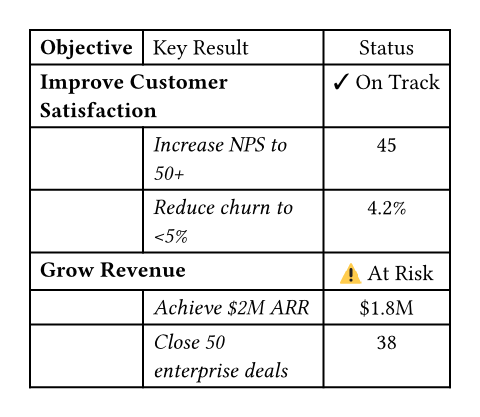
#show table.cell.where(x: 0): set text(weight: "bold")
#show table.cell.where(x: 1): set text(style: "italic")
#show table.cell.where(x: 1, y: 0): set text(style: "normal")

#table(
  columns: 3,
  align: (left, left, center),

  table.header[Objective][Key Result][Status],

  table.header(
    level: 2,
    table.cell(colspan: 2)[Improve Customer Satisfaction],
    // Status is data for this objective, not a header
    pdf.data-cell[✓ On Track],
  ),
  [], [Increase NPS to 50+], [45],
  [], [Reduce churn to \<5%], [4.2%],

  table.header(
    level: 2,
    table.cell(colspan: 2)[Grow Revenue],
    pdf.data-cell[⚠ At Risk],
  ),
  [], [Achieve \$2M ARR], [\$1.8M],
  [], [Close 50 enterprise deals], [38],
)
引数引数引数は関数への入力値です。関数名の後に括弧で囲んで指定します。
引数
引数は関数への入力値です。関数名の後に括弧で囲んで指定します。
pdf.data-cell()->cell
cellThe table cell.
This can be content or a call to table.cell.