このページはまだ翻訳されていません。原文の内容が表示されています。
table-summary
A summary of the purpose and structure of a complex table.
This will be available for Assistive Technology (AT), such as screen readers, when exporting to PDF, but not for sighted readers of your file.
This field is intended for instructions that help the user navigate the table using AT. It is not an alternative description, so do not duplicate the contents of the table within. Likewise, do not use this for the core takeaway of the table. Instead, include that in the text around the table or, even better, in a figure caption.
If in doubt whether your table is complex enough to warrant a summary, err on the side of not including one. If you are certain that your table is complex enough, consider whether a sighted user might find it challenging. They might benefit from the instructions you put here, so consider printing them visibly in the document instead.
The API of this feature is temporary. Hence, calling this function requires
enabling the a11y-extras feature flag at the moment. Even if this
functionality should be available without a feature flag in the future, the
summary will remain exclusive to PDF export.
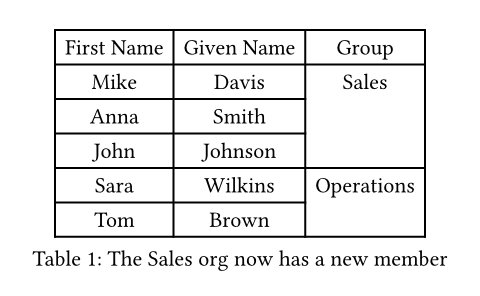
#figure(
  pdf.table-summary(
    // The summary just provides orientation and structural
    // information for AT users.
    summary: "The first two columns list the names of each participant. The last column contains cells spanning multiple rows for their assigned group.",
    table(
      columns: 3,
      table.header[First Name][Given Name][Group],
      [Mike], [Davis], table.cell(rowspan: 3)[Sales],
      [Anna], [Smith],
      [John], [Johnson],
      [Sara], [Wilkins], table.cell(rowspan: 2)[Operations],
      [Tom], [Brown],
    ),
  ),
  // This is the key takeaway of the table, so we put it in the caption.
  caption: [The Sales org now has a new member],
)
引数引数引数は関数への入力値です。関数名の後に括弧で囲んで指定します。
pdf.table-summary(,)->